


Casey's
3.912.54K Reviews
App Specs
- Version
- 27.7
- Updated On
- License
- Free
- Downloads
- 5,000,000+
- Developer
- Casey's General Store
- Categories
- Food & Drink
- Platform
- Android, iOS
Screenshots

 Analysis by AppCompare
So, I recently got my hands on the Casey's app, and let me tell you, it's like having a convenience store right in your pocket. Whether you're a regular at Casey's or just someone who loves a good slice of pizza and a tank of gas, this app might just be your new best friend. Let's dive into what makes this app worth the download.
That first-week appeal is easy to understand: food ordering, rewards, and store information sit together in one place. The app is free, and Casey's General Store is the developer behind it. I see the most value in it when Casey's is already part of my routine, rather than as a reason to make a special trip to a location I would not otherwise visit.
The First Impressions
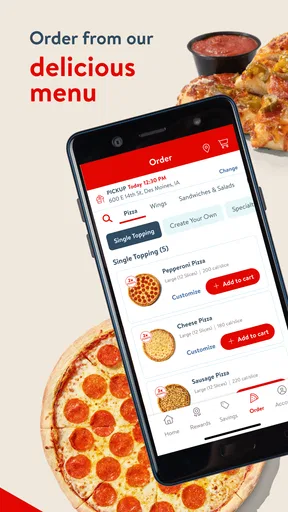
When you first open up the Casey's app, you're greeted with a clean and user-friendly interface. It's straightforward, which I appreciate because nobody likes fumbling around trying to figure out how to use an app. The main screen gives you quick access to all the essential features, making navigation a breeze.
It is aimed at everyday use, not at replacing every food or travel app on your phone. If I am already deciding what to order from Casey's, having the menu and rewards in the same place is handy. If I want to compare a wide range of restaurants, though, a general delivery or restaurant app is the more natural starting point.
Ordering Made Easy
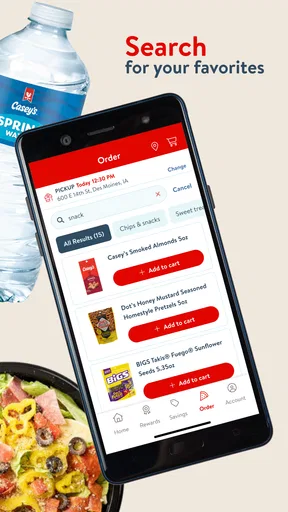
One of the standout features is the ordering system. Whether you're craving one of their famous pizzas, a breakfast sandwich, or just a quick snack, it's all there in the palm of your hand. The app provides a seamless ordering experience, allowing you to customize your orders just the way you like them.
A useful habit is to decide what you want before placing an order, then use the app to check your choices and customize them deliberately. That is more reliable than tapping through while distracted or hungry. For a household order, I would settle the toppings and preferences with everyone first; it keeps the phone from becoming a last-minute negotiation tool.
In a realistic weekday scenario, I might be heading home after work and want dinner without making another stop inside a busy store. I can check the available ordering options, make choices in advance, and use delivery if it is offered for my location. The important trade-off is that convenience depends on where I am and what ordering options are available there, so I would not assume every Casey's visit supports the same fulfilment choice.
Worth Reading Before You Choose

Flipboard Shows What News Apps Must Do Beyond the Feed

Switching to Android Auto Means Rethinking Your Driving Routine

Google Calendar Makes a Crowded Week Easier to Manage

Ludo King Makes the Most of the Minutes Between Plans

Baby Panda World Brings Quick Play to Modern Phones, but Its Game Library Feels Busy

ESPN’s Live Game View Makes Following Close Games Easier
Oh, and let's not forget about the delivery option! If you're within range, you can have your favorite Casey's items delivered right to your doorstep. It's perfect for those lazy days when leaving the house just isn't an option.
For pickup or delivery, I would still check the final order carefully before submitting it. Customization is useful, but it also means small choices matter: a change made to one item should not be mistaken for a change to the whole order. That little pause is especially worthwhile when ordering several items for different people.
Rewards and Deals Galore
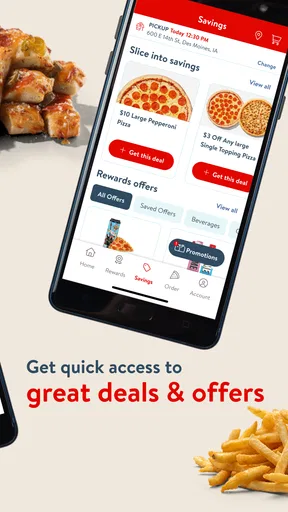
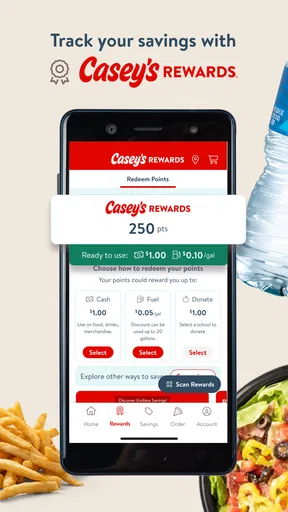
If you're someone who loves scoring a good deal, the Casey's app has you covered. The rewards program is a fantastic way to earn points on your purchases, which you can then redeem for discounts. Plus, the app frequently features exclusive deals that you won't want to miss. It's like finding extra change in your pocket every time you shop.
The points are most compelling when they reward purchases I was already going to make. I would treat them as a bonus, not as a reason to add extra food or make an unnecessary trip. A practical routine is to glance at the offers before ordering, then choose one only if it fits the meal or purchase I had in mind. That keeps the rewards useful instead of turning them into a scavenger hunt through the app.
For someone who visits Casey's only occasionally, points may build too slowly to change their habits. A frequent customer is more likely to notice recurring value, particularly if food orders and other stops are already part of their week. The app is therefore less convincing as a stand-alone coupon destination than as a companion to regular shopping.
Fuel Up the Smart Way
Another cool feature of the app is the ability to find fuel prices at nearby Casey's locations. You can even pay for your gas through the app, which speeds up the whole process. It's convenient and can save you a few bucks over time, especially if you're a frequent driver.
This is a feature I would use as a planning aid rather than a promise that Casey's will always be the best stop. If I am already near one of its locations, checking the fuel information can help me decide whether to pull in. If the detour is inconvenient or another station better suits my route, I would compare the options instead of letting points or app convenience make the decision for me.
There is a small workflow benefit here: food and fuel needs can be considered in the same trip. If I know I will need gas soon and also want to pick up dinner, I can check whether a Casey's stop makes sense for both. That is more useful than opening the app only after I have already passed the location or chosen somewhere else.
Store Locator
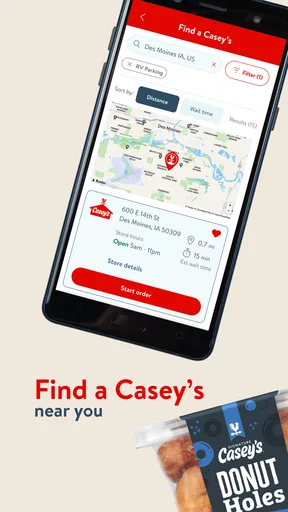
Ever been in a new town and wondered where the nearest Casey's was? The app has a handy store locator feature that shows you all the nearby locations. It even provides directions, so you'll never be far from your favorite snacks and fuel.
The locator is particularly helpful when travelling through an unfamiliar area, but I would use it with a specific purpose in mind: finding a convenient Casey's, not surveying every possible restaurant or service nearby. If the trip is time-sensitive, checking the route before setting off is better than searching while on the road. It also helps to decide whether the stop is for food, fuel, or both, since that shapes whether a location is worth a detour.
For a person who rarely visits Casey's, the locator alone is unlikely to justify keeping the app installed. A maps app is usually better for comparing many kinds of nearby places. Casey's earns its place when the destination itself is the point—when I want to find one of its stores and make use of its ordering or rewards options.
Intuitive User Experience
The app’s design is intuitive, making it easy for anyone to use, regardless of their tech-savviness. The transition between screens is smooth, and the app rarely lags, which is a huge plus in my book.
As a long-term tool, the real question is whether I remember to open it at the moments it can help. Ordering, checking offers, and looking up a store are separate reasons to return, but none is valuable if the app sits untouched between visits. I would keep it on my phone if Casey's is a regular stop; otherwise, installing it when I have a specific order or trip in mind may be enough.
There is also a sensible way to avoid making the app feel like another chore: use it when a decision is already happening. Open it while choosing dinner, before a planned fuel stop, or when looking for a Casey's in a new area. I would not check it daily just to see whether something has changed. That approach makes the app serve a habit rather than demand one.
The app has a 3.9 average from around 39,000 ratings, and it has been downloaded over five million times. Those figures suggest that it has a substantial audience, but they do not tell me whether it will fit an individual routine. My own test would be simple: after a few visits, ask whether ordering, rewards, or location lookup genuinely saved effort. If none did, it is reasonable to remove it.
What's Missing?
While the app is pretty solid, there are a couple of areas where it could improve. For instance, integrating a social aspect where users can share their favorite orders or deals would be a fun addition. Also, while it offers many features, sometimes the loading times can be a tad slow, especially during peak hours.
That occasional wait matters most when I am trying to order in a hurry or check something while already at a busy stop. My workaround is to look through choices before I am under time pressure and avoid relying on a last-second screen load to settle a decision. The convenience is real, but it is not a substitute for having a little time to complete the task.
Another possible source of fatigue is having food, fuel, and rewards together when I only need one of them. The combination is useful for Casey's regulars, yet it may feel unnecessary to someone who wants a single pizza order and rarely returns. I would not keep the app simply because it has several features; I would keep it if at least one of those features repeatedly makes a routine visit easier.
The app is free and carries an Everyone content rating, so the basic decision is less about upfront cost than about attention and phone space. It is currently version 27.1, and its minimum operating system requirement is version 7.0. For most readers, the practical question is whether their device can run it and whether Casey's is a place they use often enough to benefit.
If you are wondering whether it is worth trying for a single order, I think it can be, especially if you want to see the menu and available ordering choices in one place. If you expect a broad restaurant comparison tool, or you do not shop at Casey's, another option will probably suit you better. The app is strongest when its narrow focus matches an existing preference, not when it is expected to cover every food or convenience-store need.
Overall, the Casey's app is a must-have for anyone who frequents their stores or just loves convenience. It wraps up all the services you love about Casey's in a neat digital package. If you're a fan of easy ordering, saving money, and a streamlined shopping experience, this app is definitely worth a download. Go ahead, give it a try, and see how it transforms your Casey's visits.
My longer-term verdict is a little more specific: I would give it space on my phone if I regularly order Casey's food, use the rewards program, or stop for fuel at its locations. For an occasional visitor, it is a useful tool to pick up when a particular trip calls for it, but not an essential everyday app. Its lasting value comes from fitting into routines I already have; once that fit disappears, the convenience does too.
Pros
- User-friendly interface enhances navigation.
- Regular updates keep content fresh.
- Wide range of features for convenience.
- Loyalty program offers great rewards.
- Efficient customer service support.
Cons
- Occasional app crashes disrupt usage.
- Limited payment options available.
- Requires location access at all times.
- Some features are location-specific.
- Notifications can be overwhelming.
FAQs for Casey's
What is the primary purpose of the Casey's app?
The Casey's app is designed to enhance your convenience with features like easy ordering, exclusive deals, and rewards tracking. Users can quickly browse the menu, place orders for delivery or pickup, and earn points on every purchase. Additionally, the app provides store locations, gas prices, and promotions, making it a comprehensive tool for Casey’s customers.
Does the Casey's app offer any rewards or loyalty program?
Yes, the Casey's app includes a robust rewards program. Users can earn points on every purchase, which can be redeemed for discounts or free items. The app also offers personalized offers and promotions that are exclusive to app users, allowing for significant savings over time.
Can I use the Casey's app to order both food and fuel?
While the Casey's app excels at facilitating food orders for delivery or pickup, it also provides helpful information about fuel. Users can view real-time gas prices at nearby Casey's locations. However, fuel cannot be purchased directly through the app; users need to pay at the pump or inside the store.
Is the Casey's app user-friendly for new customers?
Absolutely, the Casey's app is designed with user-friendliness in mind. It features a clean, intuitive interface that guides users through the ordering process. New users can easily navigate through menus, find their nearest store, and access exclusive deals without any hassle. The app’s layout is straightforward, catering to both tech-savvy users and those less familiar with mobile apps.
What should I do if I encounter issues with the Casey's app?
If you experience any issues with the Casey's app, there are several steps you can take. First, try restarting the app or your device. If the problem persists, check for updates in your app store. For further assistance, you can contact Casey's customer support directly through the app or visit their website for troubleshooting tips and FAQs.


